Solved How bad would this hurt performance?

  • Welcome to skUnity!

    Welcome to skUnity! This is a forum where members of the Skript community can communicate and interact. Skript Resource Creators can post their Resources for all to see and use.

    If you haven't done so already, feel free to join our official Discord server to expand your level of interaction with the community!

    Now, what are you waiting for? Join the community now!

  • LOOKING FOR A VERSION OF SKRIPT?

    You can always check out skUnity Downloads for downloads and any other information about Skript!

tommimoro

Member
Apr 19, 2023
4
0
1
Code:
every 2 seconds:
    loop all players:
        if {skills.protcharm.%loop-value%} is true:
            execute console command "title %loop-value% actionbar {""text"":"":skill_shield:""}"


note: I would use skrayfall syntax for actionbar but it doesn't work with itemsadder emojis in 1.19.4
 
Code:
every 2 seconds:
    loop all players:
        if {skills.protcharm.%loop-value%} is true:
            execute console command "title %loop-value% actionbar {""text"":"":skill_shield:""}"


note: I would use skrayfall syntax for actionbar but it doesn't work with itemsadder emojis in 1.19.4


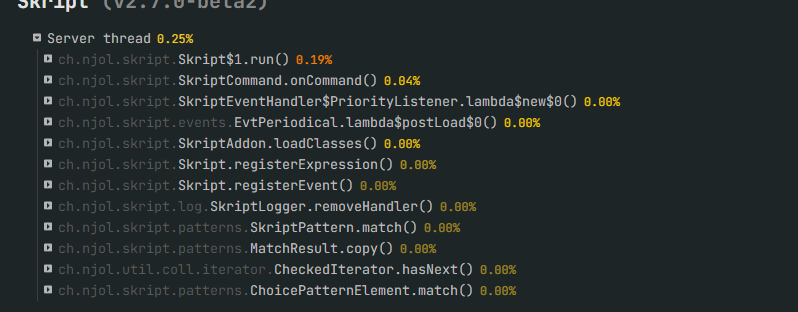
On a scale of 1 to 10? about 15. I logged my alt account via technic and logged my main account on my dev server and sat there with it on for about a 30 seconds. while it did not do much in 120 seconds and for two people. my spark profiler did this

In order to test fairly i made another script that would execute a check on command of 40 blocks randomly and remove them from a list if they are no longer there. (Very slightly modified version of what i am using)

0e82c9f23baccb90b4246e4357f79c45.png

https://gyazo.com/0e82c9f23baccb90b4246e4357f79c45

You can see what's going on there. i would not recommend. What's the goal anyways? what exactly are you trying to do?

Here is a general list of options based on what i think your trying to do.
1) you could make a plugin
2) you could use a small class plugin or a action bar plugin to do this like this or this
3) use a scoreboard and make a placeholder with skript-placeholders
 
Last edited:
On a scale of 1 to 10? about 15. I logged my alt account via technic and logged my main account on my dev server and sat there with it on for about a 30 seconds. while it did not do much in 120 seconds and for two people. my spark profiler did this

In order to test fairly i made another script that would execute a check on command of 40 blocks randomly and remove them from a list if they are no longer there. (Very slightly modified version of what i am using)

0e82c9f23baccb90b4246e4357f79c45.png

https://gyazo.com/0e82c9f23baccb90b4246e4357f79c45

You can see whats going on there. i would not recommend. What's the goal anyways? what exactly are you trying to do?

I want to display the active effects on the action bar, problem being that actionbar messages only lasts about 2 seconds. The effect i'm working on will prevent damage for a single hit.

Now I came up with this system which should theorically be better performance wise.

Code:
on right click:
    if event-item is {item.protcharm}:
        if {skills.protcharm.%player%.inuse} isn't set:
            set {skills.protcharm.%player%.inuse} to false
        if {skills.protcharm.%player%.inuse} is false:
            set {skills.protcharm.%player%.active} to true
            set {_temp} to ":skill_shield:"
            set {skills.protcharm.%player%.inuse} to true
            execute console command "title %player% actionbar {""text"":"":skill_shield:""}"
            play sound "block.beacon.activate" at volume 1 at pitch 2 to player
            loop 30 times:
                if {skills.protcharm.%player%.inuse} is true:
                    execute console command "title %player% actionbar {""text"":"":skill_shield:""}"
                    wait 1 second
                else:
                    wait 1 second
            set {skills.protcharm.%player%.inuse} to false

Code:
on damage:
    if {skills.protcharm.%victim%.active} is true:
        cancel event
        play sound "item.shield.break" at volume 1 at pitch 2 to victim
        set {skills.protcharm.%victim%.active} to false
 
I want to display the active effects on the action bar, problem being that actionbar messages only lasts about 2 seconds. The effect i'm working on will prevent damage for a single hit.

Now I came up with this system which should theorically be better performance wise.

Code:
on right click:
    if event-item is {item.protcharm}:
        if {skills.protcharm.%player%.inuse} isn't set:
            set {skills.protcharm.%player%.inuse} to false
        if {skills.protcharm.%player%.inuse} is false:
            set {skills.protcharm.%player%.active} to true
            set {_temp} to ":skill_shield:"
            set {skills.protcharm.%player%.inuse} to true
            execute console command "title %player% actionbar {""text"":"":skill_shield:""}"
            play sound "block.beacon.activate" at volume 1 at pitch 2 to player
            loop 30 times:
                if {skills.protcharm.%player%.inuse} is true:
                    execute console command "title %player% actionbar {""text"":"":skill_shield:""}"
                    wait 1 second
                else:
                    wait 1 second
            set {skills.protcharm.%player%.inuse} to false

Code:
on damage:
    if {skills.protcharm.%victim%.active} is true:
        cancel event
        play sound "item.shield.break" at volume 1 at pitch 2 to victim
        set {skills.protcharm.%victim%.active} to false


Alright now that i understand you have a few good options for this. First and probably the best. Get happyhud. and skript-placeholder.
Make a placeholder for your status effect that would output something like true or false then go in happyhud set up a listener for your placeholder. and you just made a hud element that will appear whenever a player has the thing. or just make the vanilla hearts change to a different color with a condition in happyhud. if you decide to go this route message me on discord and i will walk you through it Mittens#2223

Secondly you can use skript and quite a few other things to make particle effects and add a hologram to the players to notify others

Lastly Your new code is not bad memory wise. here are a few tips on making it run a bit faster.
  1. Any delay over five ticks is a bit overkill. and delays are only proportional to better performance up to 25 ticks i think (Not 100% sure) then it starts to go the other way and takes more just waiting to do the thing (don't use 25 fopr everything it depends on the thing. i honestly rarely use more than 2)
  2. Don't use else at all. just use if false if true take a look at this load runner article (take it with a grain of salt) Loadrunner you did a good job with this one but there is one else in there
  3. here is another one you did already. don't use any || / && in if statements. for some reason skript takes a million years to proses them
  4. here in your code
    Code:
            if {skills.protcharm.%player%.inuse} isn't set:
                set {skills.protcharm.%player%.inuse} to false
    You set it to false only to set it to true right after. switch that and set it to true right away. it's not much but it's one cycle

  5. Right before the loop you do the action bar message then like 1.5 ticks later the loop does it again. remove that top one

  6. Remove that if false under the loop and just remove 1 tab from wait 1 seconds on if true. that way it will just wait reguardless.
    like so
    Code:
                loop 30 times:
                    if {skills.protcharm.%player%.inuse} is true:
                        execute console command "title %player% actionbar {""text"":"":skill_shield:""}"
                    wait 1 second
  7. Used 'Exit' (Without quotes) whenever you can. as it will stop skript going into unnecessary checks


Please note these are quite extream and don't use them to often but for this case i esemate maybe a 60% boost to the first version

 
Last edited:
Alright now that i understand you have a few good options for this. First and probably the best. Get happyhud. and skript-placeholder.
Make a placeholder for your status effect that would output something like true or false then go in happyhud set up a listener for your placeholder. and you just made a hud element that will appear whenever a player has the thing. or just make the vanilla hearts change to a different color with a condition in happyhud. if you decide to go this route message me on discord and i will walk you through it Mittens#2223

Secondly you can use skript and quite a few other things to make particle effects and add a hologram to the players to notify others

Lastly Your new code is not bad memory wise. here are a few tips on making it run a bit faster.
  1. Any delay over five ticks is a bit overkill. and delays are only proportional to better performance up to 25 ticks i think (Not 100% sure) then it starts to go the other way and takes more just waiting to do the thing (don't use 25 fopr everything it depends on the thing. i honestly rarely use more than 2)
  2. Don't use else at all. just use if false if true take a look at this load runner article (take it with a grain of salt) Loadrunner you did a good job with this one but there is one else in there
  3. here is another one you did already. don't use any || / && in if statements. for some reason skript takes a million years to proses them
  4. here in your code
    Code:
            if {skills.protcharm.%player%.inuse} isn't set:
                set {skills.protcharm.%player%.inuse} to false
    You set it to false only to set it to true right after. switch that and set it to true right away. it's not much but it's one cycle

  5. Right before the loop you do the action bar message then like 1.5 ticks later the loop does it again. remove that top one

  6. Remove that if false under the loop and just remove 1 tab from wait 1 seconds on if true. that way it will just wait reguardless.
    like so
    Code:
                loop 30 times:
                    if {skills.protcharm.%player%.inuse} is true:
                        execute console command "title %player% actionbar {""text"":"":skill_shield:""}"
                    wait 1 second
  7. Used 'Exit' (Without quotes) whenever you can. as it will stop skript going into unnecessary checks


Please note these are quite extream and don't use them to often but for this case i esemate maybe a 60% boost to the first version

Thanks. I will stick to skript for now and will apply your suggestion for optimization
 
Let's not listen to these bozos, i loop hundreds of players each ticks and do multiple actions on them each time it loops so each ticks and it only costs me 0.24 tps. My server isnt even that good its a rasperry pi 4 with 8GB of ram